
DrawEasy: AR Drawing Sketch




Overview
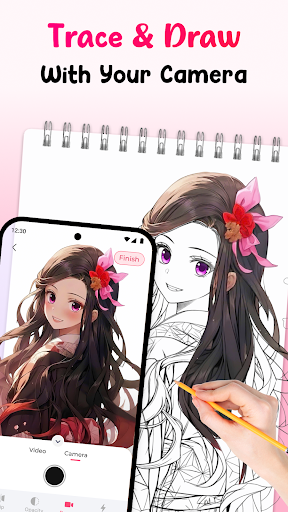
For aspiring artists and seasoned doodlers alike, finding an engaging way to translate digital inspiration into physical art can be a challenge. Bridging the gap between your phone's screen and a blank canvas, DrawEasy: AR Drawing Sketch offers an innovative solution. This application leverages augmented reality to transform your smartphone into a versatile drawing assistant, projecting images onto real-world surfaces for easy tracing. Whether you're looking to practice specific techniques, learn to sketch popular characters, or simply bring a personal photo to life, this tool aims to make the process accessible and enjoyable for everyone, regardless of their artistic background. Our review will explore its key features, highlight its strengths and weaknesses, and guide you through getting started.
Key Features
- AR projection technology allows users to trace digital images onto physical surfaces.
- Access an extensive library containing over one thousand diverse drawing templates.
- Generate unique sketches using AI from uploaded photos or descriptive text prompts.
- Integrated image search functionality helps users discover and import new design ideas.
- Step-by-step tutorials provide guidance for learning various drawing techniques.
- Automated coloring features simplify the shading process with multiple artistic styles.
Pros & Cons
Pros
- Makes complex drawing accessible through intuitive AR tracing.
- Wide variety of templates caters to diverse artistic interests and skill levels.
- AI features offer creative assistance and personalization options.
- User-friendly interface is suitable for all ages and skill levels.
Cons
- Some advanced functionalities are likely locked behind in-app purchases.
- Performance can vary significantly based on the device's hardware capabilities.
- Certain features, like AI generation, may not be fully functional without an internet connection.
- The developer's name, "king master massage," is unusual for an art application.
How to Use DrawEasy: AR Drawing Sketch
- Install the DrawEasy: AR Drawing Sketch application from your device's app store.
- Launch the app and grant the necessary camera and storage permissions when prompted.
- Select a template from the extensive library or create a custom image using the AI generator or photo upload.
- Position your device above the surface where you want to draw, aligning the projected image.
- Trace the projected lines onto your paper or chosen material with your preferred drawing tool.
- Refine your sketch, then optionally utilize the auto-coloring feature to add color.
Frequently Asked Questions
Is DrawEasy suitable for absolute beginners?
Does this app require an internet connection to work?
Are there any costs associated with using DrawEasy?
How does the AR projection feature work for drawing?
Can I use my own images for tracing or inspiration?
Similar to This App


Hot Apps