
Women's Bible



Overview
For individuals seeking to integrate faith more deeply into their daily lives, a dedicated spiritual companion can be a valuable tool. This is particularly true for women who appreciate content crafted with their unique experiences in mind. The Women's Bible app, developed by JSK Developer, aims to be just that, offering a comprehensive suite of resources for scripture study and reflection. With a strong 4.76 rating from over 500,000 downloads, it positions itself as a popular choice for those looking to nurture their connection with God through a mobile platform. This review will explore its key features, highlight its advantages and disadvantages, and guide new users through its initial setup and functionality. We will also address common questions prospective users might have regarding its use and accessibility.
Key Features
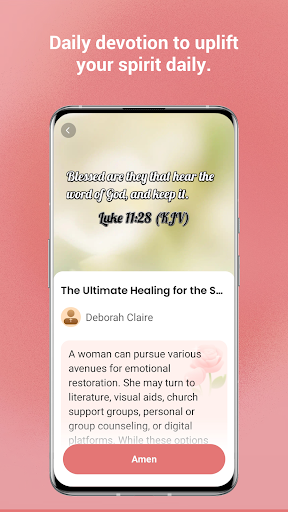
- Provides daily devotionals tailored to women's spiritual journey and reflections.
- Includes an audio Bible for listening to scriptures on the go or during relaxation.
- Offers personalized study tools like highlighting, note-taking, and bookmarking verses.
- Engage with interactive quizzes to test and reinforce biblical knowledge in a fun way.
- Access the full Bible text and all devotionals without an internet connection.
- Features an elegant design combined with a user-friendly and intuitive interface.
Pros & Cons
Pros
- Content and interface are specifically designed to resonate with women.
- Offline access ensures uninterrupted study and devotional time anywhere.
- Integrated audio Bible and interactive quizzes enhance engagement and learning.
- High user rating indicates a positive and satisfying overall experience.
Cons
- Some advanced functionalities or additional content may require in-app purchases.
- The specific focus on women might limit its broader appeal to all users.
- The developer provides minimal information beyond the app's core description.
- Requires Android 8.0 or newer, potentially excluding users with older devices.
How to Use Women's Bible
- Install the Women's Bible app from the Google Play Store onto your compatible Android device.
- Launch the application and grant any necessary permissions for full functionality.
- Explore the main dashboard to find daily devotionals or navigate to the Bible section.
- Select a book and chapter to begin reading or activate the audio Bible feature for listening.
- Utilize the integrated study tools to highlight verses, add personal notes, or bookmark favorite passages.
- Engage with interactive quizzes periodically to test and deepen your scriptural understanding.
Frequently Asked Questions
Does Women's Bible require an internet connection?
Are there any costs associated with using the app?
Is this app suitable for men?
Can I sync my notes and highlights across multiple devices?
What languages does the app support?
Similar to This App


Hot Apps