
Booksy for Customers




Overview
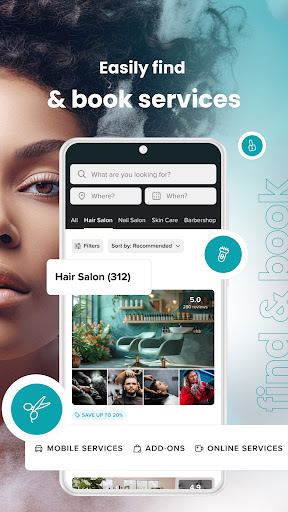
Managing personal grooming and wellness appointments can often be a chore, involving phone calls, inconvenient hours, and often, playing phone tag. For anyone looking to streamline their self-care routine, Booksy for Customers offers a compelling solution. This popular app aims to simplify the entire process of finding, booking, and managing services like haircuts, massages, manicures, and more, all from your smartphone. With its high user rating and millions of downloads, it positions itself as a central hub for connecting users with a vast network of beauty and wellness professionals. Our review will explore its features, highlight its strengths, point out potential drawbacks, and guide you through getting started, helping you decide if this app fits into your modern lifestyle.
Key Features
- Access 24/7 booking for various self-care and wellness services.
- Flexible options to reschedule, cancel, or rebook appointments seamlessly.
- Automated reminder notifications ensure you never miss an upcoming service.
- Discover new service providers and conveniently compare their pricing.
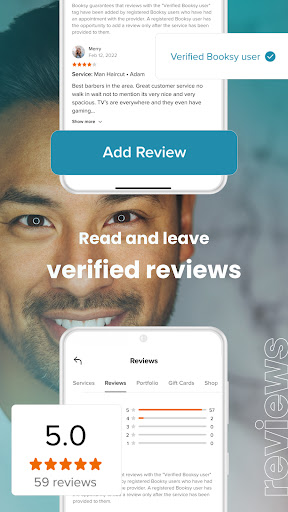
- Read authentic reviews from other users before confirming your booking.
- Securely process payments directly within the app where supported by providers.
- Intuitive interface design makes navigating the entire booking process simple.
Pros & Cons
Pros
- Streamlined booking process available at any time of day.
- Comprehensive directory of local beauty and wellness professionals.
- Helpful reminder notifications reduce the chance of missed appointments.
- User-friendly design makes navigation simple for everyone.
- In-app payment options offer added convenience and security.
Cons
- Service availability is entirely dependent on providers registering with Booksy.
- Some regions may have a limited selection of participating businesses.
- Functionality is restricted to Booksy-affiliated businesses only.
- Occasional bugs or performance glitches may occur, as with any app.
How to Use Booksy for Customers
- Install the Booksy for Customers app from the Google Play Store on your Android device.
- Create a new account or log in using your existing credentials.
- Search for specific services like 'haircut' or 'massage,' or browse by category and location.
- Browse through available providers, compare prices, and read user reviews.
- Select your preferred service, choose a convenient date and time slot.
- Confirm your appointment details and complete any required payment securely within the app.
- Receive automated reminders and manage your bookings directly from your personal dashboard.
Frequently Asked Questions
Is Booksy for Customers free to use?
Do I need an account to use the app?
Can I cancel or change appointments through the app?
Are all beauty and wellness businesses available on Booksy?
What if I have a problem with a booking or a service provider?
Does Booksy support contactless payments?
Similar to This App


Hot Apps