
Expedia: Hotels, Flights, Cars
Category
Travel & Local
Downloads
50M+
Developer
Expedia
Available on
Android, iOS
OS
10





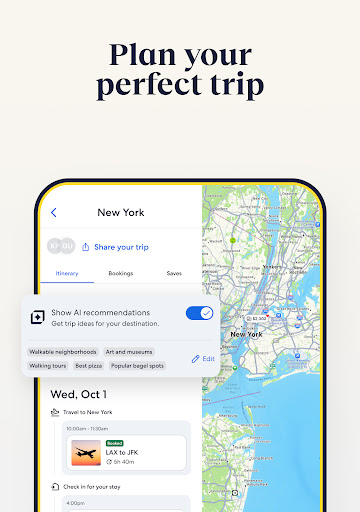


Overview
Finding the right tools to streamline your travel arrangements can significantly reduce stress and potentially save money. For many, a single platform that handles various aspects of a trip is ideal. Expedia: Hotels, Flights, Cars aims to be that comprehensive solution, offering a consolidated approach to booking essential travel components. This review will delve into its core functionalities, highlighting what makes it a compelling choice for travelers, while also pointing out potential areas where users might encounter limitations. We'll cover everything from its booking capabilities and rewards program to its user interface, helping you decide if this app deserves a permanent spot on your device for future adventures.
Key Features
- Search and compare a vast selection of flights, hotels, and rental cars globally.
- Book complete vacation packages, combining flights, hotels, and car rentals for convenience.
- Access exclusive member discounts and earn rewards points for future travel bookings.
- Manage all your trip details in one place, including itineraries and booking confirmations.
- Receive real-time notifications for flight delays, gate changes, and hotel check-in times.
- Benefit from personalized recommendations based on your travel history and preferences.
- Utilize flexible cancellation options available on many hotel and car rental bookings.
Pros & Cons
Pros
- Offers a convenient all-in-one platform for booking diverse travel services.
- Expedia Rewards program provides tangible savings and points for frequent users.
- Real-time updates help travelers stay informed about changes to their itinerary.
- User-friendly interface makes navigating booking options straightforward.
- Extensive inventory of hotels and car rental companies provides ample choice.
Cons
- Prices can fluctuate rapidly, requiring users to monitor deals closely.
- Some exclusive deals may come with specific restrictions or blackout dates.
- Occasional technical glitches can occur, especially during high-demand periods.
- Requires a constant internet connection for most functionalities.
- Customer service can be difficult to reach during peak travel times.
How to Use Expedia: Hotels, Flights, Cars
- Download the Expedia app from the Google Play Store and open it.
- Sign up for a free Expedia Rewards account or log in with existing credentials to access member benefits.
- Select your desired travel service, such as "Flights," "Hotels," or "Cars," from the main menu.
- Enter your travel details, including destination, dates, and number of travelers, then tap "Search."
- Browse through the results, applying filters for price, ratings, or amenities to refine your choices.
- Review your selection, proceed to booking, and securely complete your payment information.
- Access your confirmed itinerary and receive real-time updates within the app's "Trips" section.
Frequently Asked Questions
Is the Expedia app free to download and use?
Yes, the Expedia app is free to download and install on your Android device. You only pay for the travel services you choose to book through the platform.
Do I need an account to book travel through the app?
While you can browse and search without an account, creating an Expedia Rewards account is recommended. It allows you to earn points, access exclusive member deals, and manage all your bookings in one place.
Can I manage existing bookings made on the Expedia website through the app?
Yes, once you log into the app with the same account used for your website bookings, all your trips will be synchronized. You can view, modify, and receive updates for those reservations directly in the app.
Does the app offer offline functionality for itineraries?
While booking and real-time updates require an internet connection, once an itinerary is downloaded or saved, you can often access basic details like flight numbers, hotel addresses, and confirmation codes offline. However, interactive maps or live updates will still need connectivity.
Are there any hidden fees when booking through the app?
Expedia strives for transparency, showing all applicable taxes and fees before final confirmation. However, some hotels may charge resort fees or local taxes upon arrival, which are typically disclosed during the booking process.
Similar to This App

Booking.com: Hotels & Travel
Travel & Local

Fly Delta
Travel & Local

United Airlines
Travel & Local

American Airlines
Travel & Local

Upside: Gas & Food Cash Back
Travel & Local

Airbnb
Travel & Local

Instabridge: WiFi Hotspot Map
Travel & Local

Google Earth
Travel & Local

U-Haul
Travel & Local

Duolingo: Language Lessons
Education
Hot Apps
Booking.com: Hotels & Travel
Travel & Local
Fly Delta
Travel & Local
United Airlines
Travel & Local
American Airlines
Travel & Local
Upside: Gas & Food Cash Back
Travel & Local
Airbnb
Travel & Local
Instabridge: WiFi Hotspot Map
Travel & Local
Google Earth
Travel & Local
U-Haul
Travel & Local
Duolingo: Language Lessons
Education