
United Airlines
Category
Travel & Local
Downloads
10M+
Developer
United Airlines
Available on
Android, iOS
OS
10
Overview
Staying connected to your travel plans and managing logistics on the go is crucial for a smooth journey. For passengers flying with United Airlines, a dedicated mobile application aims to serve as an all-in-one digital companion. This tool brings essential flight information, booking capabilities, and real-time updates directly to your Android device. From initial flight search to post-landing baggage tracking, the app promises to streamline various aspects of air travel. This review will explore its key functionalities, highlight its advantages, point out potential drawbacks, and provide guidance on how to make the most of its features, helping you decide if it’s an indispensable addition to your travel toolkit.
Key Features
- Effortlessly search United's global network and book flight tickets for yourself or others.
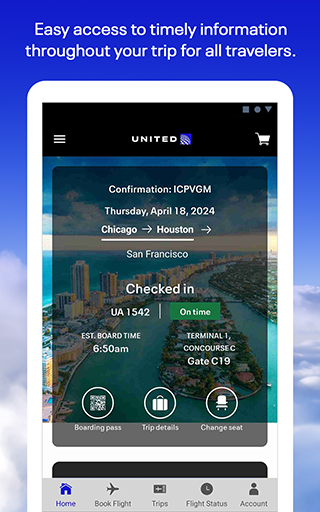
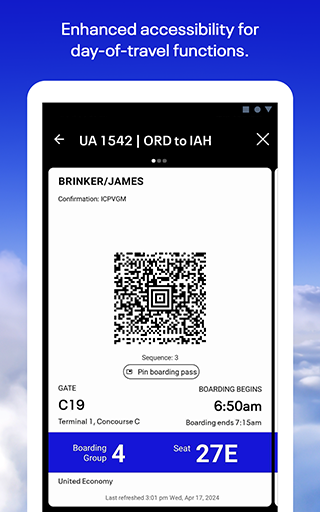
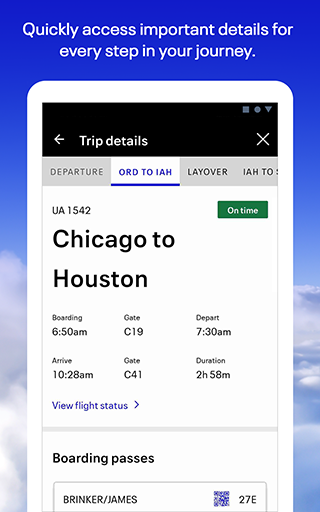
- Bypass airport queues by checking in directly through the app and downloading your mobile boarding pass.
- Modify seat preferences or change existing flights if more suitable options become available.
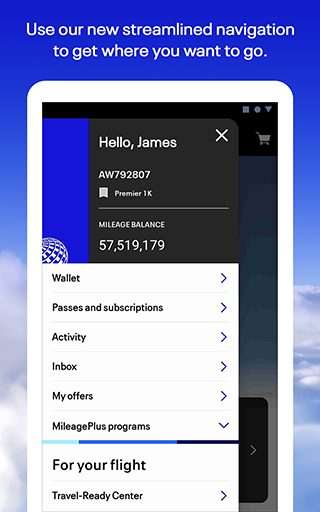
- Access a Travel-Ready Center to ensure all necessary health forms and visa requirements are met.
- Add bags to your booking, utilize designated drop-off shortcuts, and monitor their journey in real-time.
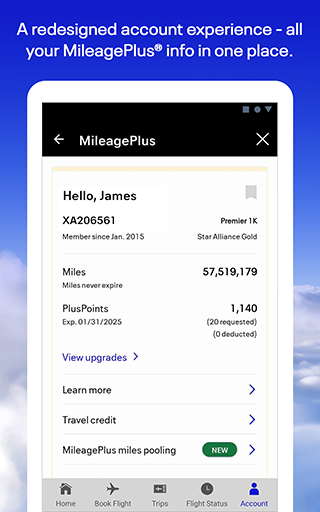
- Manage your MileagePlus account, accrue loyalty miles, and redeem them for future award travel.
- Connect with customer service agents via chat, text, or video for assistance with any queries.
Pros & Cons
Pros
- User-friendly interface simplifies complex travel management tasks.
- Streamlined mobile check-in and digital boarding pass generation save time at the airport.
- Comprehensive integration with the MileagePlus loyalty program enhances member benefits.
- Real-time baggage tracking provides peace of mind regarding luggage location.
Cons
- Some users have reported occasional technical issues, particularly with the check-in process.
- Limited language options may not cater to all international travelers.
- Heavy reliance on an internet connection for real-time updates and booking functions.
- Constant use of features like tracking can potentially drain device battery faster.
How to Use United Airlines
- Install the United Airlines application from the Google Play Store on your Android device.
- Open the app and either log in with your existing MileagePlus account or proceed as a guest.
- Enter your confirmation number, e-ticket number, or MileagePlus number to find an existing reservation.
- Access your mobile boarding pass directly from the home screen for upcoming flights.
- Monitor real-time flight status, gate changes, and baggage tracking information.
- Explore options to change seats, modify flights, or book new travel arrangements.
Frequently Asked Questions
Is the United app free to download and use?
Yes, the United Airlines app is free to download from the Google Play Store. While the app itself is free, standard charges for flights, upgrades, and other airline services still apply.
Do I need a MileagePlus account to use the app?
You do not strictly need a MileagePlus account for basic functions like checking flight status or accessing general travel information. However, logging in with an account unlocks full features such as managing bookings, accessing digital boarding passes, and utilizing loyalty program benefits.
Can I use the app when I don't have an internet connection?
Some features, like viewing a previously downloaded mobile boarding pass or accessing stored trip details, may work offline. However, most real-time functions, including flight status updates, check-in, and booking new flights, require an active internet connection.
How can I contact customer support through the app?
The app provides direct access to customer support options. You can connect with agents via chat, text, or even video calls for assistance with any questions or issues you might encounter during your travel.
Can I manage my baggage through the app?
Yes, the app allows you to add bags to your booking and track their journey. You can monitor the real-time location of your checked luggage from drop-off to arrival.
Similar to This App

Expedia: Hotels, Flights, Cars
Travel & Local

Booking.com: Hotels & Travel
Travel & Local

Fly Delta
Travel & Local

American Airlines
Travel & Local

Upside: Gas & Food Cash Back
Travel & Local

Airbnb
Travel & Local

Instabridge: WiFi Hotspot Map
Travel & Local

Google Earth
Travel & Local

U-Haul
Travel & Local

Duolingo: Language Lessons
Education
Hot Apps
Expedia: Hotels, Flights, Cars
Travel & Local
Booking.com: Hotels & Travel
Travel & Local
Fly Delta
Travel & Local
American Airlines
Travel & Local
Upside: Gas & Food Cash Back
Travel & Local
Airbnb
Travel & Local
Instabridge: WiFi Hotspot Map
Travel & Local
Google Earth
Travel & Local
U-Haul
Travel & Local
Duolingo: Language Lessons
Education