
Live Weather: Daily Forecast
Category
Weather
Downloads
1M+
Developer
WINDWAVE LIMITED
Available on
Android, iOS
OS
7.0


Overview
Staying informed about local conditions or planning for upcoming travel often requires a reliable weather application. Live Weather: Daily Forecast aims to be a comprehensive tool for anyone needing up-to-the-minute meteorological data. Developed by WINDWAVE LIMITED, this Android app has garnered over a million downloads and maintains a respectable 4.48-star rating, suggesting a generally positive user experience. This review will explore its core functionalities, highlight its strengths and weaknesses, and guide prospective users through its initial setup. We'll cover everything from its global forecasting capabilities to its air quality monitoring and severe weather alerts, helping you decide if this app fits your daily needs.
Key Features
- Real-time updates showing temperature, humidity, wind speed, and air pressure.
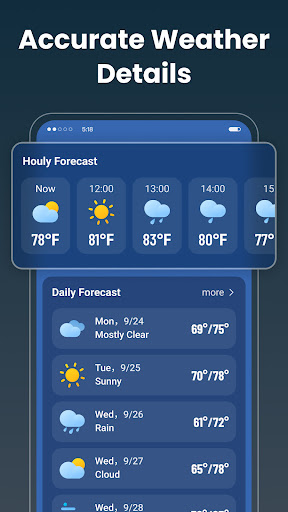
- Detailed hourly forecasts covering the next 48 hours for precise planning.
- Daily predictions extending up to ten days, aiding longer-term preparations.
- Dynamic displays of sunrise, sunset, moonrise, and moonset times for outdoor activities.
- Air quality monitoring, providing specific indices like PM2.5, PM10, and ozone.
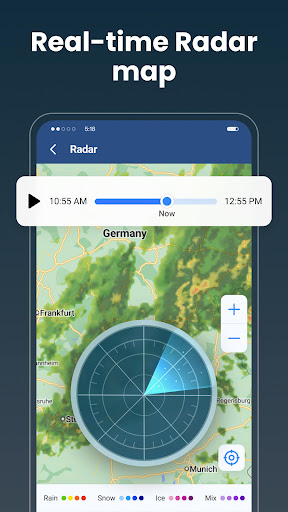
- Timely severe weather alerts for events such as heavy rain, thunderstorms, and snow.
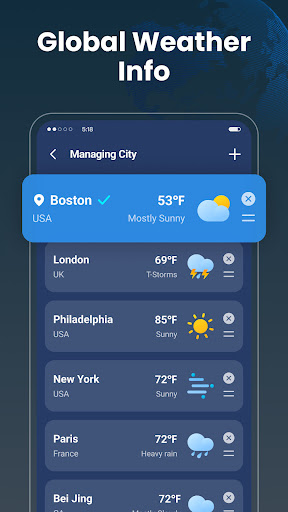
- Customizable location tracking to view weather for multiple cities effortlessly.
Pros & Cons
Pros
- Highly accurate weather data, reportedly powered by NOAA sources.
- User-friendly interface with clear and visually appealing graphics.
- Comprehensive features including air quality and severe weather alerts.
- Supports tracking multiple locations and offers unit preferences (Fahrenheit/Celsius).
Cons
- Some advanced features might require in-app purchases to unlock full functionality.
- Occasional delays in real-time updates have been noted during extreme weather events.
- Continuous use of location services and data can lead to increased battery drain.
- Reliance on an active internet connection for fresh, real-time weather information.
How to Use Live Weather: Daily Forecast
- Install the Live Weather: Daily Forecast app from the Google Play Store.
- Open the application once the installation process is complete.
- Grant necessary location permissions when prompted to receive accurate local forecasts.
- Explore the main dashboard, which displays current weather conditions for your location.
- Tap the search or add location icon to include other cities you wish to monitor.
- Customize settings for preferred units (e.g., Fahrenheit or Celsius) and notification preferences.
Frequently Asked Questions
Is Live Weather: Daily Forecast free to use?
The app is free to download and offers core functionalities without charge. However, some advanced features or premium content may require in-app purchases to unlock.
What data sources does the app use for its forecasts?
Live Weather: Daily Forecast leverages advanced meteorological data to provide precise information. The developer specifically mentions that its highly accurate weather data is powered by NOAA.
Does the app work offline or require an internet connection?
While the app might display cached data when offline, receiving real-time updates, detailed hourly/daily forecasts, and severe weather alerts requires an active internet connection. Offline functionality is limited.
Can I receive severe weather alerts through the app?
Yes, the app is designed to provide timely notifications for severe weather events. Users can receive alerts for natural disasters such as heavy rain, thunderstorms, and snowstorms to stay prepared.
Can I track weather for multiple locations simultaneously?
Absolutely. The app includes a customizable locations feature that allows you to easily add and track multiple cities. This enables you to view weather details for different regions effortlessly.
Similar to This App

Weather Forecast & Live Radar
Weather

The Weather Channel - Radar
Weather

Daily Weather: Forecast&Alerts
Weather

Nice Weather
Weather

1Weather Forecasts & Radar
Weather

Live Weather Radar Launcher
Weather

Weather Now Launcher - Radar
Weather

DailyWeather: Weather Forecast
Weather

Warm Weather
Weather

Duolingo: Language Lessons
Education
Hot Apps
Weather Forecast & Live Radar
Weather
The Weather Channel - Radar
Weather
Daily Weather: Forecast&Alerts
Weather
Nice Weather
Weather
1Weather Forecasts & Radar
Weather
Live Weather Radar Launcher
Weather
Weather Now Launcher - Radar
Weather
DailyWeather: Weather Forecast
Weather
Warm Weather
Weather
Duolingo: Language Lessons
Education