
Live Weather Radar Launcher


Overview
Staying informed about local and global weather conditions is a common need, whether for daily planning or tracking severe events. The Live Weather Radar Launcher positions itself as an all-in-one solution for this, combining detailed forecasts with real-time radar imagery. This application aims to provide a comprehensive weather experience, catering to users who appreciate visual data and customizable alerts. It integrates weather information directly into a launcher experience, which could be a significant convenience or a point of contention depending on user preferences. This review will delve into its core features, highlight its strengths and weaknesses, and guide prospective users on how to get started, helping them decide if it's the right fit for their Android device.
Key Features
- Access real-time radar maps to track precipitation, storms, and cloud movements accurately.
- View detailed hourly, daily, and 7-day weather predictions, including temperature and wind.
- Receive timely alerts for severe weather conditions like hurricanes and thunderstorms.
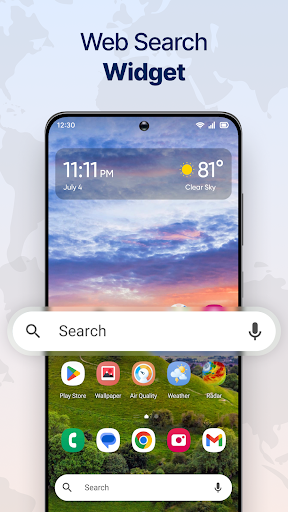
- Personalize your home screen with customizable widgets displaying key weather data.
- Monitor air quality index (AQI) information alongside standard meteorological readings.
- Track weather conditions for any location across the globe, ideal for travelers.
Pros & Cons
Pros
- User-friendly interface with clear, visually appealing graphics.
- Comprehensive weather data, including AQI and advanced radar maps.
- Reliable and accurate forecasts sourced from trusted meteorological providers.
- Highly customizable widgets allow for personalized home screen displays.
Cons
- Some advanced features or an ad-free experience require a paid subscription.
- Occasional delays in radar updates have been reported during peak usage times.
- The 'launcher' aspect might alter the home screen, which not all users prefer.
- Requires Android 10 or newer, potentially excluding users with older devices.
How to Use Live Weather Radar Launcher
- Install the Live Weather Radar Launcher from the Google Play Store on your Android device.
- Open the application for the first time and grant any necessary location or system permissions.
- Set your primary location to receive accurate local forecasts and alerts.
- Explore the live radar map by pinching to zoom and swiping to pan across different regions.
- Customize your home screen by adding weather widgets through the app's settings or your device's widget menu.
- Configure severe weather alerts to receive notifications for critical weather events in your area.
Frequently Asked Questions
Is Live Weather Radar Launcher free to use?
Does the app work offline?
How accurate are the weather forecasts?
What does the 'Launcher' part of the name mean?
Can I get severe weather alerts for any location?
Similar to This App


Hot Apps