
SeatGeek – Tickets to Events



Overview
Attending live events, whether it's a major sporting match, a sold-out concert, or a captivating theater performance, often begins with the challenge of securing tickets. This is where SeatGeek – Tickets to Events aims to simplify the process, offering a comprehensive mobile marketplace for both buying and selling access to a wide array of entertainment. The application, developed by SeatGeek, positions itself as more than just a transaction platform; it promises an intuitive experience designed to help users find ideal seats at fair prices. With features like its unique "Deal Score" and interactive seating charts, it strives to empower attendees with better information before they commit to a purchase. This review will explore how well the app delivers on these promises, examining its core functionalities, user experience, and overall value for event-goers.
Key Features
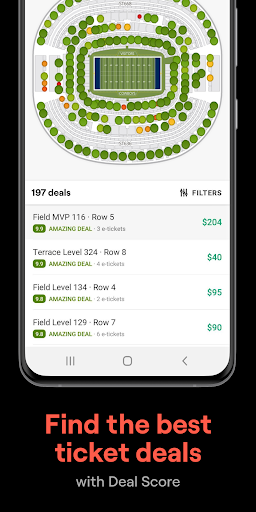
- Proprietary Deal Score algorithm evaluates ticket value based on price, location, and visibility.
- Dynamic seat maps allow users to visualize their exact view from any selected section.
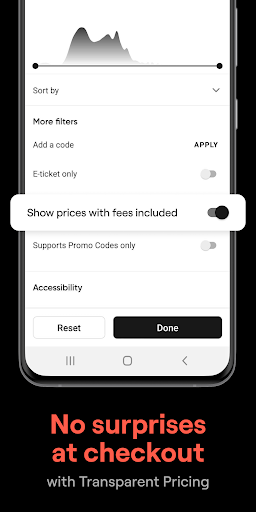
- Transparent pricing model displays the total cost upfront, including all service fees.
- Personalized event tracking sends alerts for favorite teams, artists, or upcoming shows.
- Streamlined ticket transfer and resale process for convenient management of purchases.
Pros & Cons
Pros
- User-friendly interface simplifies finding, buying, and selling event tickets.
- "Deal Score" feature helps identify good value tickets efficiently.
- Interactive seat maps provide a clear visual of the stage or field view.
- Transparent pricing ensures no unexpected fees are added at checkout.
- Supports both purchasing and reselling tickets within the same platform.
Cons
- Ticket availability can be limited for smaller or highly specialized local events.
- Some users have reported occasional technical issues or slowdowns during peak demand.
- Service fees, while transparent, can still add a significant percentage to ticket prices.
- Requires a stable internet connection for browsing listings and completing transactions.
How to Use SeatGeek – Tickets to Events
- Download and install the SeatGeek app from the Google Play Store on your Android device.
- Open the application and either sign up for a new account or log in with existing credentials.
- Browse for events by searching for specific artists, teams, venues, or by exploring categories like sports, concerts, or theater.
- Select an event to view available tickets, utilizing the "Deal Score" and interactive seat maps to compare options.
- Choose your desired seats and proceed to the checkout, where all-inclusive pricing will be displayed.
- Complete the purchase securely using your preferred payment method.
- Access your digital tickets directly within the app, ready for entry or easy transfer.
Frequently Asked Questions
Is SeatGeek safe to use for purchasing tickets?
Are there hidden fees when buying tickets?
Can I sell my tickets through the app?
Does the app require an account to browse events?
What is the "Deal Score" feature?
Similar to This App


Hot Apps